RandomRoute AEP Lab guide
From an empty workspace to a passing closed-loop test against an Adobe Experience Platform development sandbox.
Synthetic data and non-production only. Production sandboxes and real personal data are refused, with no override.
1. What this is and what it is not
RandomRoute AEP Lab is a test harness for Adobe Experience Platform development sandboxes. It sends known, synthetic test data into a development sandbox, checks that Real-Time Customer Profile and Adobe Journey Optimizer (AJO) react the way you expect, and receives the calls AJO makes back out, so you can test a whole journey from one place.
What you can do with it:
- Connect a development sandbox through an Adobe Developer Console project (OAuth Server-to-Server).
- Generate sets of synthetic profiles that can never be mistaken for real people.
- Run suites of ready-made checks ("recipes"): token, sandbox, schemas, datasets, streaming a profile and an event, waiting for them to show up in Profile, sending an AJO unitary event, triggering an API-triggered campaign.
- Create AJO receivers: URLs that AJO custom actions and external data sources can call, with ready-to-paste settings for AJO.
- Run loop tests: send an event into a journey and wait for the journey's custom action to call your receiver, then compare what arrived with what you expected.
- Schedule suites as monitors, start them from CI through the API, and get a signed webhook when a run finishes.
What it is not:
- Not a connector. It doesn't sync data between Adobe and anything else.
- Not a data pipeline. It sends a handful of test records, never real customer data, and never in bulk.
- Not for production. It refuses production sandboxes, and it refuses requests to Adobe that contain anything that looks like real personal data. Neither rule can be switched off, by you or by an administrator.
- Not the Edge Network. Web SDK, Mobile SDK and Edge Network calls are out of scope. Data goes in through an HTTP API streaming source only.
Adobe, Adobe Experience Platform and Adobe Journey Optimizer are trademarks of Adobe Inc. RandomRoute AEP Lab is an independent testing tool and is not affiliated with, endorsed by or sponsored by Adobe.
2. The two rules
RandomRoute AEP Lab has two rules. They're enforced on every request to an Adobe host: requests from suites, loop tests, monitors, the API and the request builder all go through the same guards. There is no setting, plan or role that turns them off.
1. Synthetic data only
Every request to Adobe is checked before it is sent. If any field, header or query parameter contains a value that looks like real personal data, the request is refused with BLOCKED_PII, and the body is not stored in history. These are the rules, quoted from the code that enforces them:
- Email: The local part starts with "rr-" and the domain is example.com, example.net or example.org, or ends in .example, .test or .invalid.
- Phone (E.164): The North American fictional block only: +1, any 3-digit area code, then 555-0100 to 555-0199 (+1XXX5550100 … +1XXX5550199). Any other number is refused.
- ECID: 38 digits starting with 99, generated by RandomRoute API Workbench, so it cannot collide with a real ECID.
- CRM, loyalty and custom IDs: Start with "rr-synth-".
- Names: One of the 200 built-in, obviously fictional names (Testy McTestface and friends), or a name that contains "synthetic" or "test".
- Free text: No real-looking email address, phone number, payment card number, US Social Security number, Canadian Social Insurance number or street address, unless the email or phone number is synthetic by the rules above.
The Synthetic profiles page generates profiles that follow these rules, so you don't have to invent them. If you write your own payloads in the request builder, use the same shapes.
2. Development sandboxes only
A connection names one sandbox. Before anything is sent to it, RandomRoute AEP Lab looks the sandbox up with the Sandbox Management API (GET /data/foundation/sandbox-management/sandboxes/{name}) and accepts it only when Adobe reports all three of:
typeisdevelopment,isDefaultisfalse,stateisactive.
Anything else is refused with ADOBE_SANDBOX_REFUSED and a message that says why (a production sandbox, the default sandbox, a sandbox that isn't active yet, or one Adobe couldn't find). A successful check is remembered for 15 minutes and then made again, so a sandbox that is reset or changed in the meantime is caught on the next run. A request that tries to point somewhere else with its own x-sandbox-name header is refused with the same code, and only Adobe hosts on a fixed allowlist ever receive Adobe credentials (ADOBE_HOST_NOT_ALLOWED).
There is no override. If you need to test something in production, do it with Adobe's own tools, under your organization's data policies.
3. Create the Adobe Developer Console project
RandomRoute AEP Lab authenticates with an OAuth Server-to-Server credential from the Adobe Developer Console. You need a System Administrator or Developer role in the Adobe organization, and a development sandbox in Experience Platform.
-
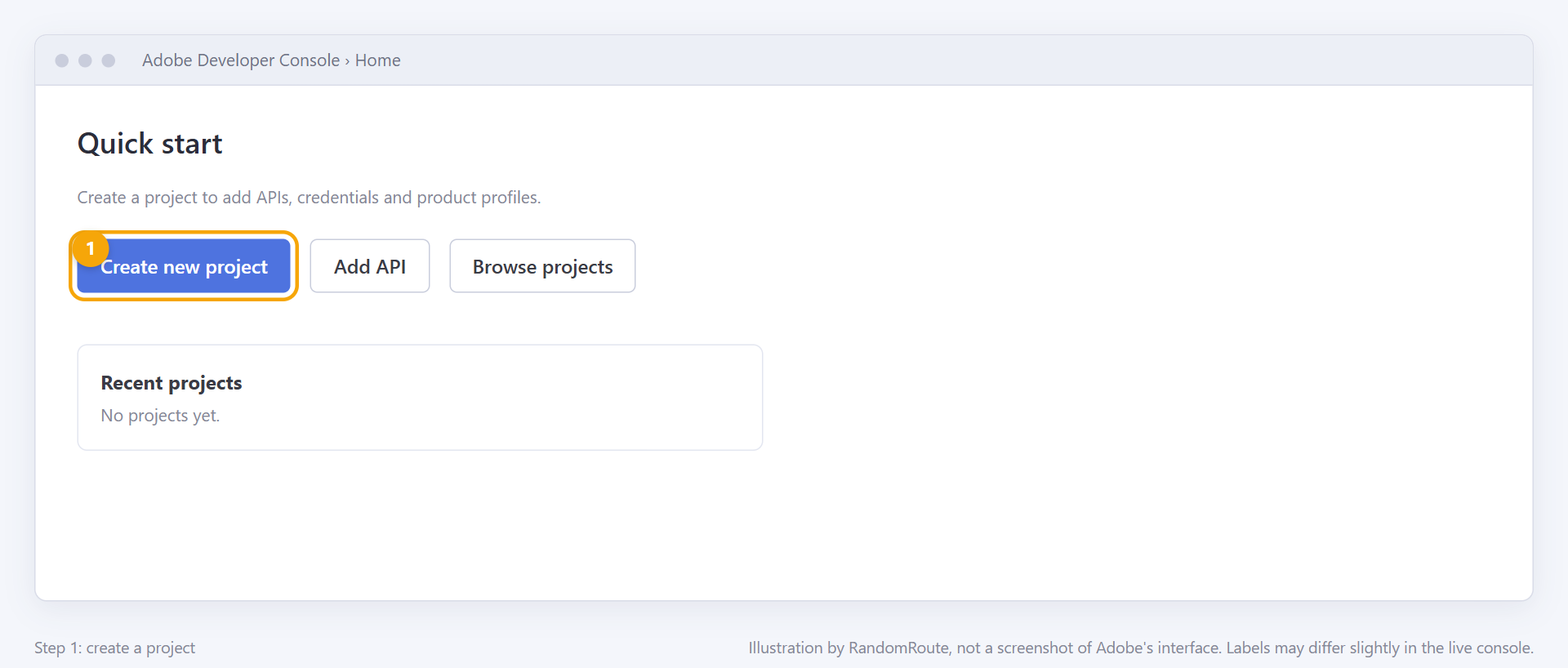
Open the Adobe Developer Console and choose Create new project. Give it a name you'll recognize, such as "RandomRoute API Workbench – dev sandbox".
-
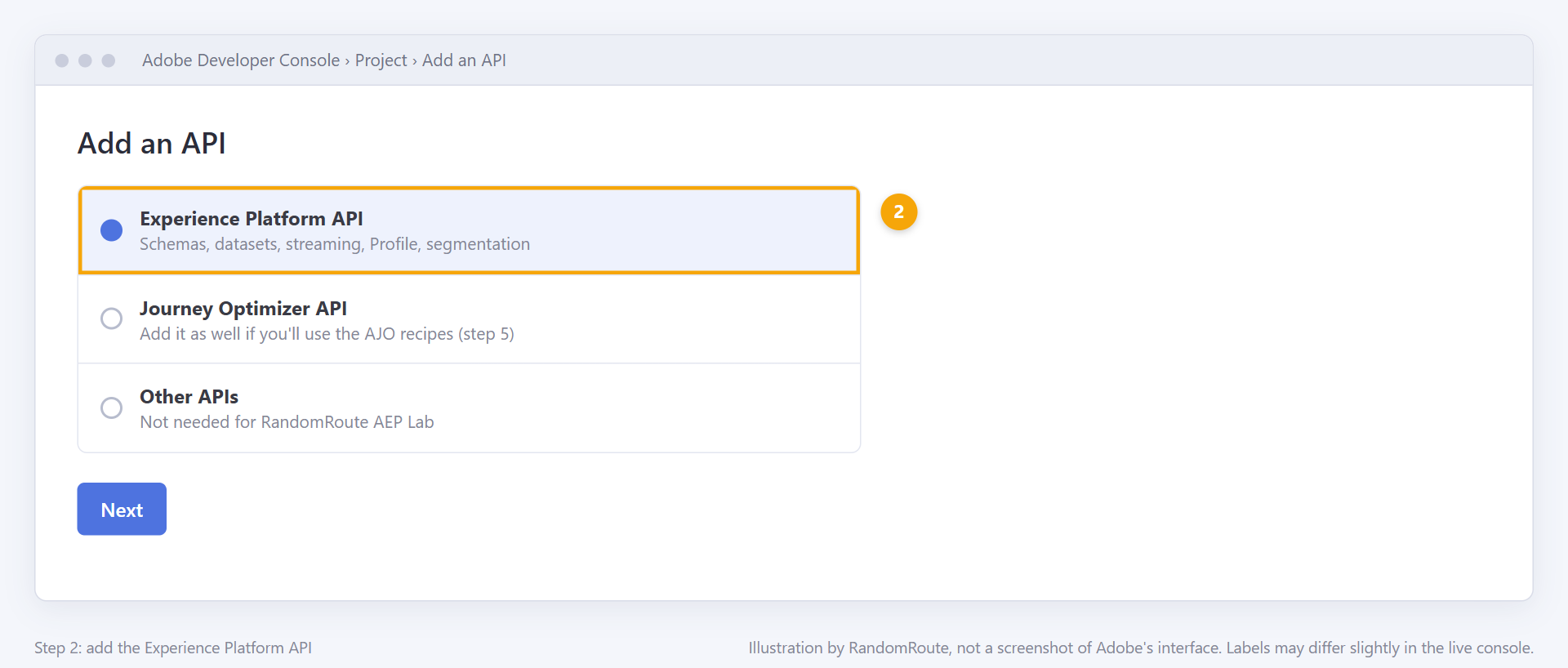
Choose Add API, select Experience Platform API, and continue.
-
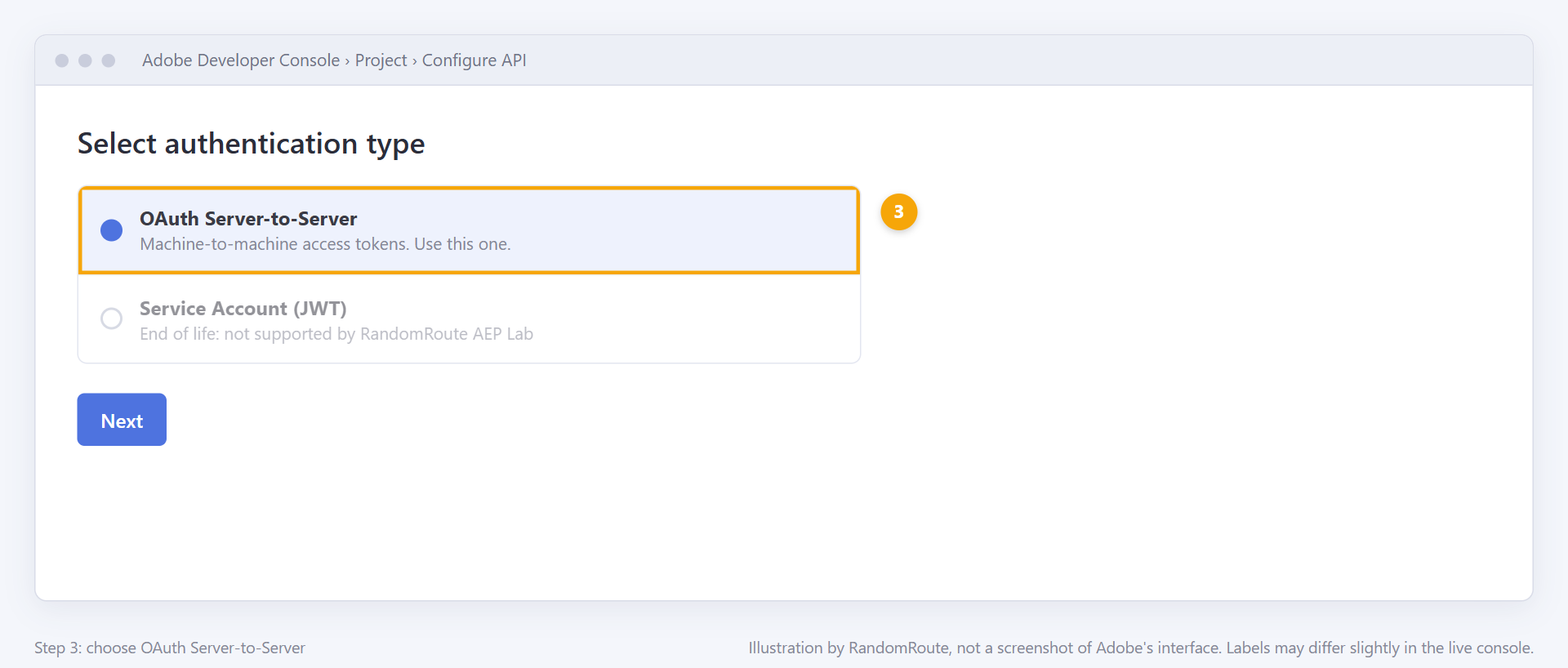
When asked for the authentication type, choose OAuth Server-to-Server. (The older JWT credential is end-of-life; RandomRoute AEP Lab doesn't support it.)
-
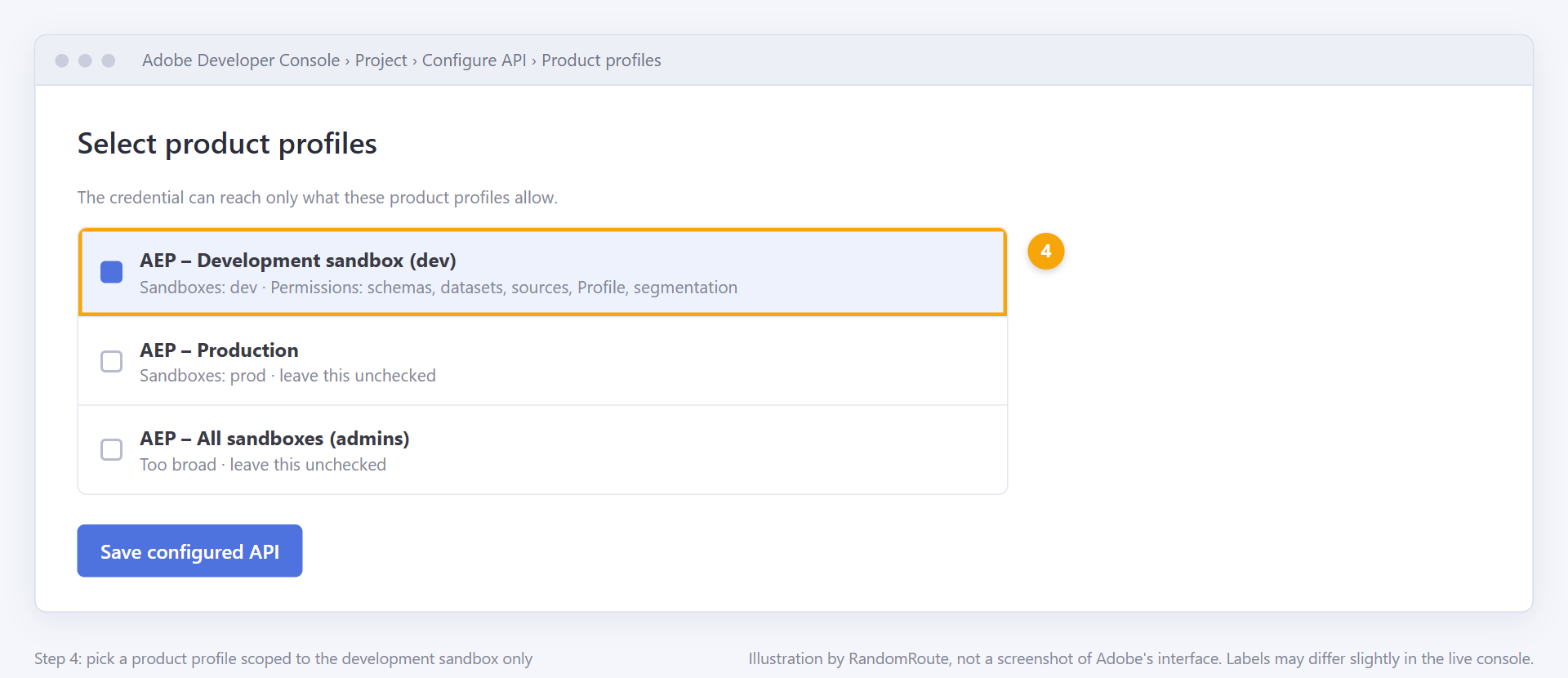
Select the product profiles the credential gets. Pick or create a product profile whose permissions include only your development sandbox, not production. This is the most important step: it means the credential itself can't reach production, whatever happens.
-
If you'll use AJO recipes (unitary events, API-triggered campaigns), choose Add API again and add Adobe Journey Optimizer, with the same credential and the same development-only product profile.
-
Save the configured API. Open the OAuth Server-to-Server credential in the project. Copy these values; you'll paste them into RandomRoute AEP Lab:
Value in the console Where it appears Field in RandomRoute AEP Lab Client ID Credential details, "Client ID" Client ID Client secret Credential details, "Retrieve client secret" Client secret Organization ID Credential details, ends in @AdobeOrgIMS organization ID Scopes Credential details, "Scopes" (comma-separated) Scopes Token URL "Generate access token" / cURL sample: https://ims-na1.adobelogin.com/ims/token/v3Token URL 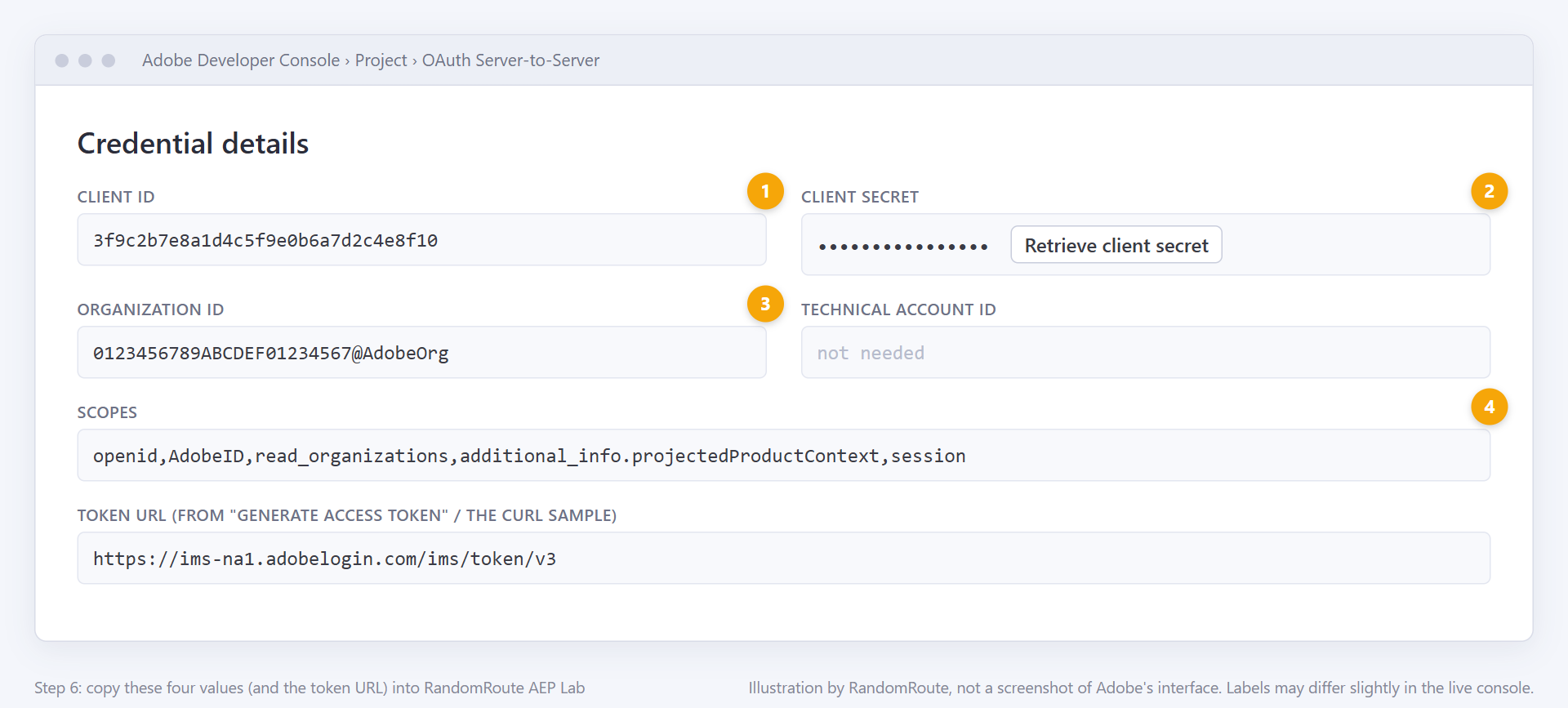
-
Note the sandbox name (not its title) from Experience Platform → Sandboxes → Browse. It's the lower-case name shown in the URL and the sandbox list, for example
devordev-2.
The client secret is shown in the console whenever you retrieve it. In RandomRoute AEP Lab it's encrypted when you save it and never shown again.
4. Add the connection in RandomRoute API Workbench
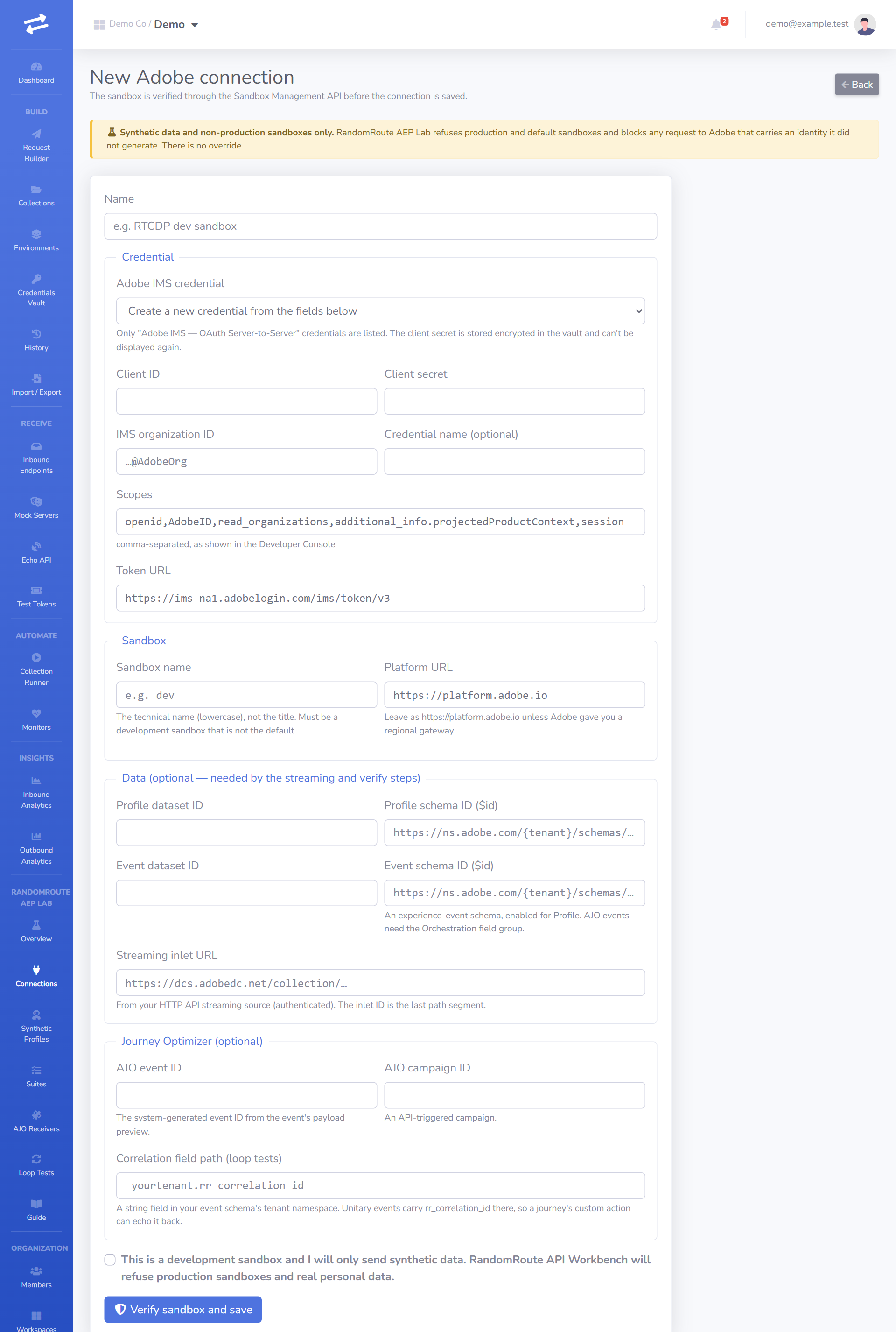
Go to RandomRoute AEP Lab → Connections → New connection. Admins and Owners can create connections; Editors can use them.
The form has three parts:
- Credential. Choose an existing "Adobe IMS" credential from the vault, or fill in a new one: Client ID, Client secret, IMS organization ID, Scopes and Token URL from the Developer Console. A new credential is saved to the vault, encrypted, and can be reused by other connections.
- Sandbox. The sandbox name, and the Platform URL (
https://platform.adobe.iounless Adobe told you otherwise). - Optional ids used by recipes: the profile and event dataset ids and schema ids, the streaming inlet URL, the AJO event id, the AJO campaign id and the correlation field path for loop tests. You can add these later, as you set them up (next sections). A recipe whose inputs are missing is shown as skipped, with the reason.
At the bottom is the attestation. You must tick it to save:
This is a development sandbox and I will only send synthetic data. RandomRoute API Workbench will refuse production sandboxes and real personal data.
Test connection
Saving runs the sandbox check. Test connection on the connection's page runs four checks and shows the result of each:
- IMS access token. The client id, secret and scopes are right, and the token endpoint issues a token. The token is cached, encrypted, and renewed 5 minutes before it expires.
- Sandbox verification. Adobe confirms the sandbox is an active development sandbox that is not the default. This is what turns the connection's badge to Verified.
- Schemas (first page). The credential's product profile can read the sandbox's schema registry.
- Datasets (first page). It can read the Catalog too.
A failure at step 1 is almost always a wrong secret or scope list. A 403 at steps 3–4 usually means the product profile doesn't include this sandbox.
5. Prepare the sandbox
The streaming and Profile recipes need a few things in the sandbox. You set them up once, in Experience Platform, and paste their ids into the connection.
A profile schema and dataset
- In Experience Platform → Schemas, create a schema based on the XDM Individual Profile class, with the identity fields you'll use (at least a personal email, marked as the primary identity in the Email namespace). Enable it for Profile.
- In Datasets, create a dataset from that schema and enable it for Profile.
- Copy the schema's
$id(Schemas → the schema → the API usage panel; it looks likehttps://ns.adobe.com/{tenant}/schemas/…) and the dataset id. Paste them into the connection as Profile schema ID and Profile dataset ID.
An event schema and dataset (for events and AJO)
- Create a schema based on the XDM ExperienceEvent class. Add the Orchestration eventID field group (AJO needs it to route unitary events to journeys), an identity map, and, for loop tests, a string field to carry the correlation id (for example
_yourtenant.rr_correlation_id). Enable the schema for Profile. - Create a dataset from it, enable it for Profile, and paste the ids into the connection as Event schema ID and Event dataset ID.
- Put the correlation field's path, as it appears in the event (for example
_yourtenant.rr_correlation_id), into Correlation field path (loop tests).
An HTTP API streaming source
RandomRoute AEP Lab streams records through the HTTP API streaming source, with authentication required.
- In the UI: Sources → HTTP API → set up a new account with Enable authentication on → choose the dataset → finish the dataflow. The connection's Streaming endpoint (the inlet URL) is shown on the dataflow's details.
- With the API: follow Adobe's HTTP API streaming connection tutorial: create the base connection with
authenticationRequired: true, readinletUrlfromGET /data/foundation/flowservice/connections/{id}, then create the source connection, target connection and dataflow.
Paste the inlet URL (https://dcs.adobedc.net/collection/…) into the connection as Streaming inlet URL.
Wait about 5 minutes after creating the dataflow before you stream to it. Records sent earlier can be lost.
RandomRoute AEP Lab sends every streamed record with syncValidation=true, so validation errors come back immediately. Adobe limits these calls to 60 per minute per connection; suites stay well under that.
6. Synthetic profiles
Go to RandomRoute AEP Lab → Synthetic Profiles → New set. Choose:
- Profiles: how many to generate (up to the limit of your plan).
- Seed (optional): the same seed always produces the same profiles, so a test is repeatable. Leave it empty for a random seed.
- Identities: email is always included; add phone, ECID and CRM id as your schema needs them. Every profile also gets a fictional first and last name and a loyalty tier.
Each profile follows the rules in "The two rules". A profile looks like this:
| Field | Example |
|---|---|
rr-7f3a9c21@example.com |
|
| Phone | +12025550142 |
| ECID | 99 followed by 36 digits |
| CRM id | rr-synth-7f3a9c21d0e4 |
| Name | Testy McTestface |
Suites and loop tests use the set's profiles as variables, for example {{profile.email}} and {{profile.ecid}}. A suite can use the set's first profile every time, the next profile on each run (round robin), or iterate over every profile in one run (up to 100).
After a suite has streamed a profile, you'll find it in Experience Platform → Profiles → browse by identity, namespace Email, with the synthetic address. The stream.profile.verify recipe does the same lookup through the Profile Access API and waits until the profile appears.
Download a set as CSV from its page, or regenerate it from its seed. Deleting a set is refused while a suite or loop test uses it.
7. Run your first suite
Go to RandomRoute AEP Lab → Suites → New suite, choose the connection and the profile set, and pick Recommended suite. It selects every recipe the connection has the ids for, in this order:
- IMS access token
- Sandbox is a development sandbox
- Schema registry (first page), Datasets (first page), Profile dataset exists and is enabled for Profile
- Stream a synthetic profile, Stream a synthetic experience event
- Profile is visible in Real-Time Customer Profile, Experience events are visible for the profile
- Segment definitions (first page)
- Send an AJO unitary event, Trigger an API-triggered campaign (when the AJO ids are set)
Save, then Run. The run page updates as it goes, one row per step with its status, attempts, duration and HTTP status.
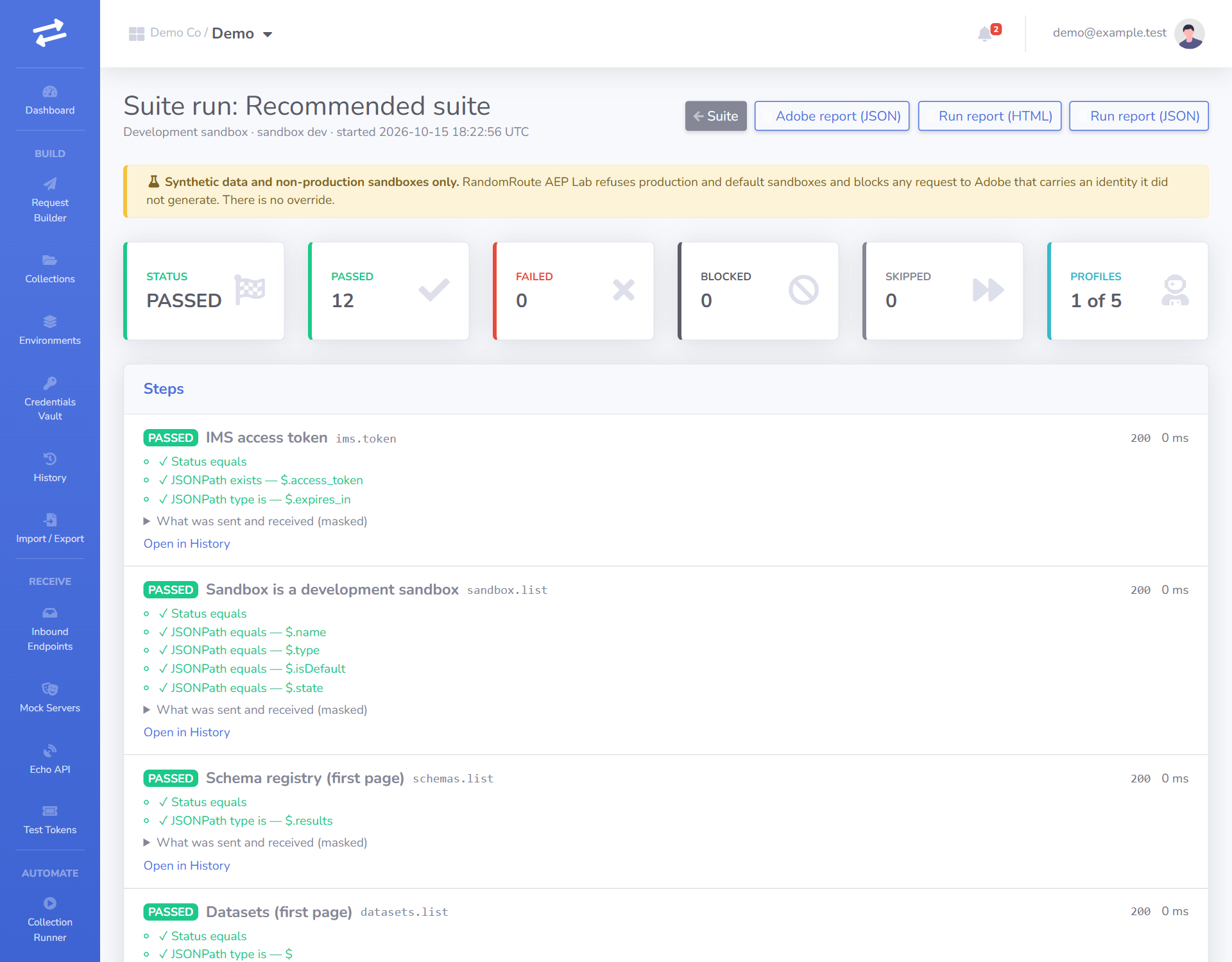
Polled steps
Profile ingestion isn't instant. The two "is visible" steps poll the Profile Access API: they wait 5 seconds, then 7.5, then about 11, and so on, until the profile (or its events) appears or the suite's poll timeout runs out. A polled step that times out fails with the number of attempts made.
Reading the report
Each failed step shows the request that was sent (with every secret masked), Adobe's response, and the assertion that failed. The report can be downloaded as JSON (the Adobe report) or as the collection run's HTML/JSON report. Behind the scenes, a suite is a normal collection named "AEP Lab suite: …", so its requests also appear in History.
Common failures
| Symptom | Usual cause |
|---|---|
403 on schemas, datasets or Profile |
The credential's product profile doesn't include this sandbox, or lacks the permission (for example "View Profiles"). |
400 with a syncValidation report |
The streamed record doesn't match the schema: a missing required field, a wrong $id, or the dataset was built from another schema. |
| Profile never becomes visible | The dataset or schema isn't enabled for Profile, the dataflow is less than 5 minutes old, or the identity namespace in the schema isn't Email. |
ADOBE_SANDBOX_REFUSED |
The sandbox isn't an active, non-default development sandbox. This is by design and can't be overridden. |
BLOCKED_PII |
A value in the request isn't synthetic. The report names the field (never the value). |
8. AJO: unitary events
A unitary event starts a journey for one profile. RandomRoute AEP Lab sends it through the same streaming inlet as other events.
-
In Journey Optimizer → Configurations → Events, create an event. Choose Unitary, type Rule-based or System-generated id as you prefer, and select your event schema (the one with the Orchestration eventID field group). Pick the fields the journey needs, and the Email namespace as the identity.
-
Open the event's payload preview and copy the system-generated eventID from
_experience.campaign.orchestration.eventID.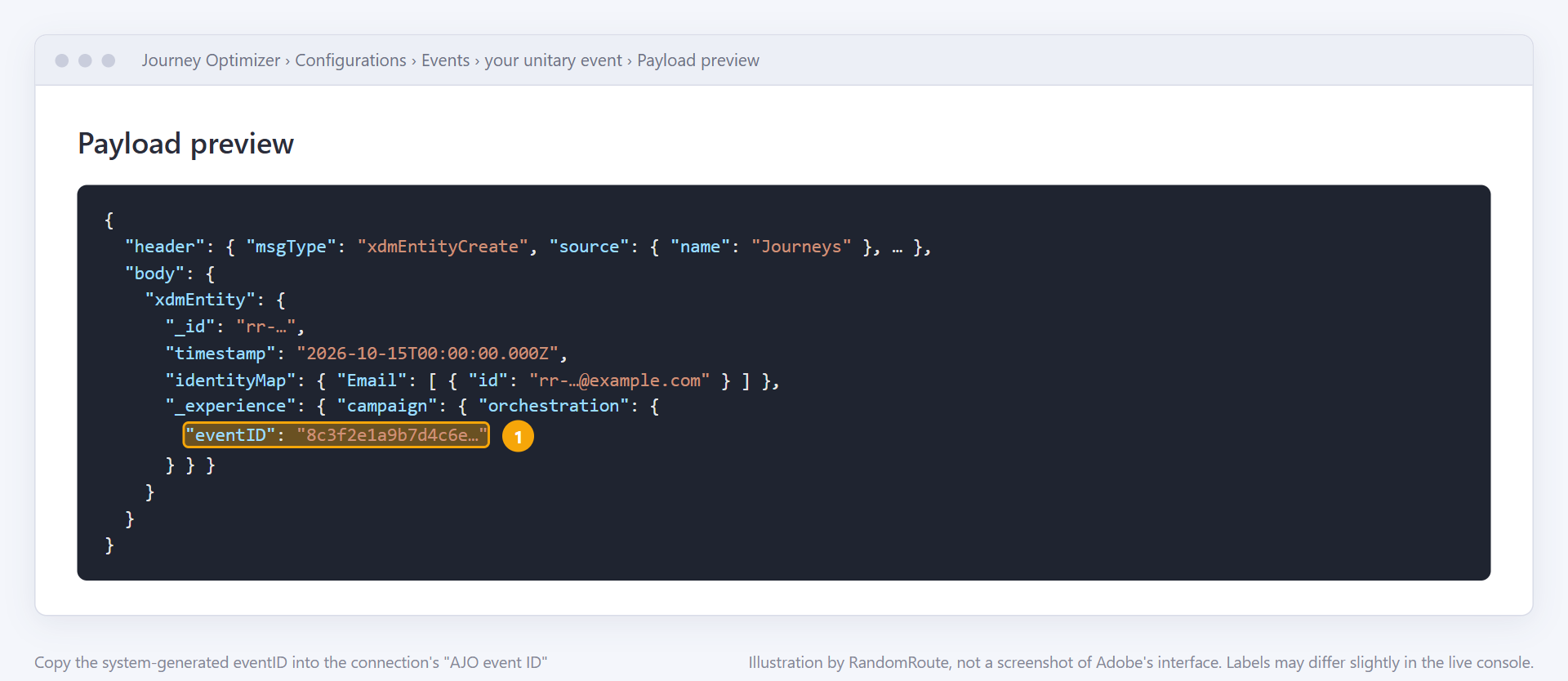
-
Paste it into the connection as AJO event ID.
-
Build a journey that starts with this event, and publish it (in a development sandbox, a published test journey is fine).
-
Run the
ajo.unitary_eventrecipe (it's in the Recommended suite once the event id is set). The step passes when the inlet accepts the event withsyncValidationstatuspass.
Only streamed events trigger journeys, and only for profiles that exist: run "Stream a synthetic profile" first (the Recommended suite does).
To see the journey react, open it in AJO and check its reporting, or use a loop test (section "The closed loop") to have the journey call back into RandomRoute AEP Lab.
9. AJO: custom actions and data sources
An AJO receiver is a URL that Journey Optimizer can call: from a custom action in a journey, or as an external data source. RandomRoute AEP Lab records every call, checks it, and answers with the sample response you define, so you can build and test the journey before the real endpoint exists.
Create a receiver
Go to RandomRoute AEP Lab → AJO Receivers → New receiver and choose:
- Kind: Custom action (AJO sends POST) or Data source (AJO sends GET).
- Authentication: None, API key, Basic, or a static Bearer token, each backed by a vault credential. (AJO has no "Bearer" type: the panel tells you to configure a Bearer token in AJO as an API key named
Authorizationwith the valueBearer <token>, in the header.) - Correlation path: where the call carries the loop-test correlation id (a JSONPath into the body, or a query parameter for GET calls).
- Response delay: 0–500 ms. AJO routes endpoints slower than 0.75 s through a slower service; keep it low unless you're testing that.
- Request payload sample (custom actions): the JSON AJO will send. Write
"{{name}}"for a value the journey fills in. Every other value is a constant. - Response sample (HTTP 200) and Error sample (HTTP 500, returned when the call has
?rr_fail=1). - Expected JSON Schema (optional): each call is checked against it, and the result is shown with the call.
Paste it into AJO
The receiver's page has a paste-into-AJO panel with everything AJO's configuration screen asks for, in the same order: the URL, the method, the headers (each marked Constant or Variable), the authentication block (without the secret; you type that into AJO yourself), the request payload with each field's type, and the response and error samples.
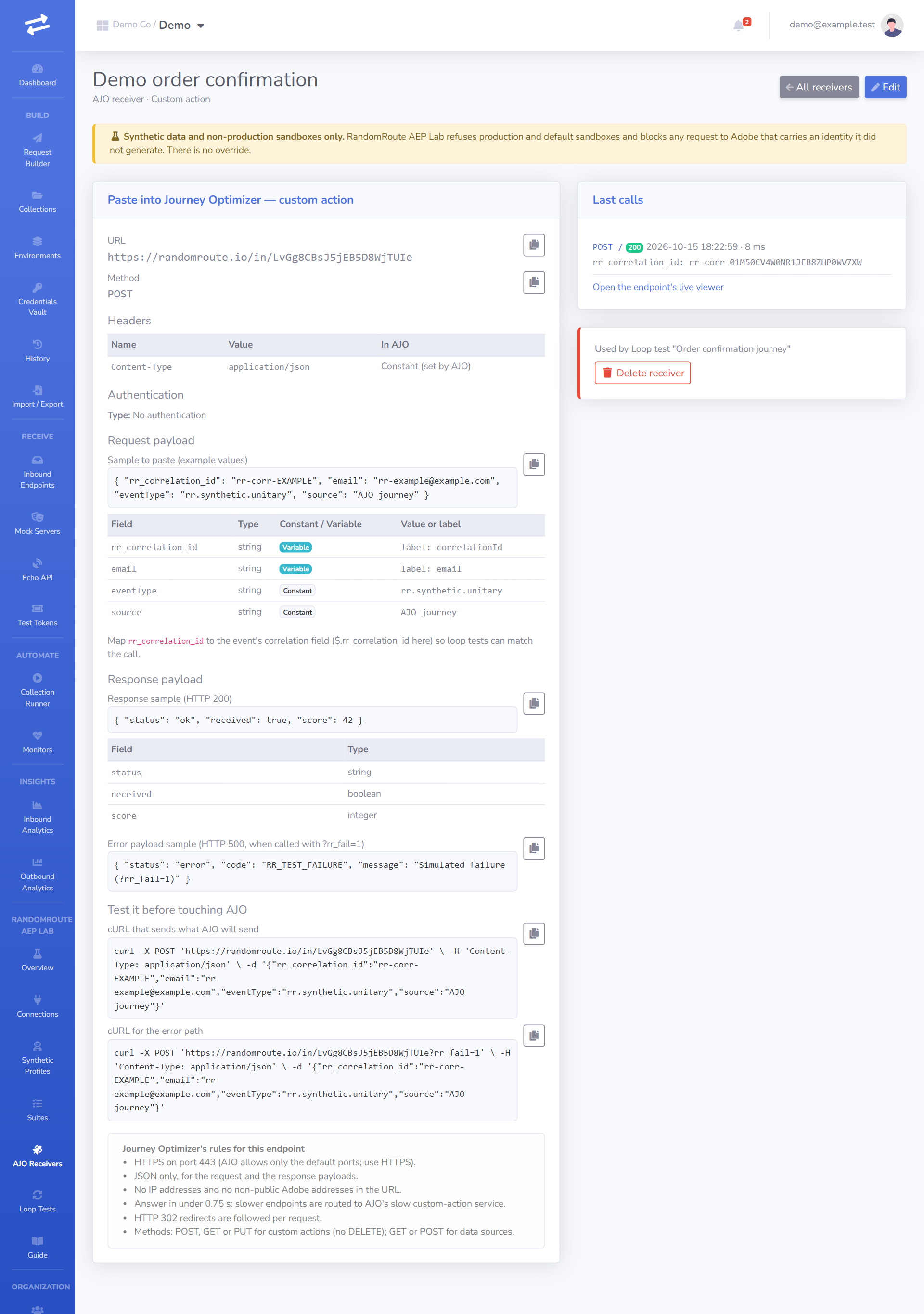
In Journey Optimizer → Configurations → Actions (or Data sources), create the action and copy each value across. For the payload, paste the request sample and mark the fields the panel lists as Variable.
Test it
The panel includes two cURL commands, one for the success path and one for the error path. Run them from a terminal: each call appears at once under Calls on the receiver's page, with its headers (secrets masked), body, schema result and the response it got.
Calls that fail authentication are recorded too, flagged, and answered 401, so a wrong key in AJO shows up as a row you can read rather than silence.
AJO allows the default ports only (443 for HTTPS), no IP addresses, and JSON payloads only. Receivers are always served over HTTPS on this site, so they meet those rules.
10. AJO: the closed loop
A loop test checks a whole journey from end to end: RandomRoute AEP Lab sends an event that starts the journey, the journey's custom action calls a RandomRoute AEP Lab receiver, and RandomRoute AEP Lab matches the call to the event and compares it with what you expected.
Build the journey
- Set up the unitary event (section "AJO: unitary events") with a correlation field in its schema, and put that field's path on the connection as Correlation field path.
- Create a receiver (previous section) whose correlation path points to where the custom action sends the correlation id, for example
$.rr_correlation_idin the body. - In AJO, build a journey: the event → the custom action. In the action's payload, map the event's correlation field into the receiver's correlation field, and map any profile values you want to check (for example the email). Publish the journey.
Create and run the loop test
Go to RandomRoute AEP Lab → Loop Tests → New loop test and choose the connection, the profile set, the event recipe, the receiver, a timeout (how long to wait for the call), the expected method, and the expected values, one per line, such as:
$.email = {{profile.email}}
$.channel = email
Each line is JSONPath = expected value. Profile variables are resolved when the event is sent, so regenerating the set later doesn't change what a waiting run expects. You can also add a JSON Schema the call must match.
Press Run. RandomRoute AEP Lab:
- creates a correlation id (
rr-corr-…) and puts it in the event, - sends the event through the guards (the event is refused if the sandbox or data doesn't pass the rules),
- waits for a call to the receiver that carries the same correlation id,
- compares the call with the expected method, values and schema.
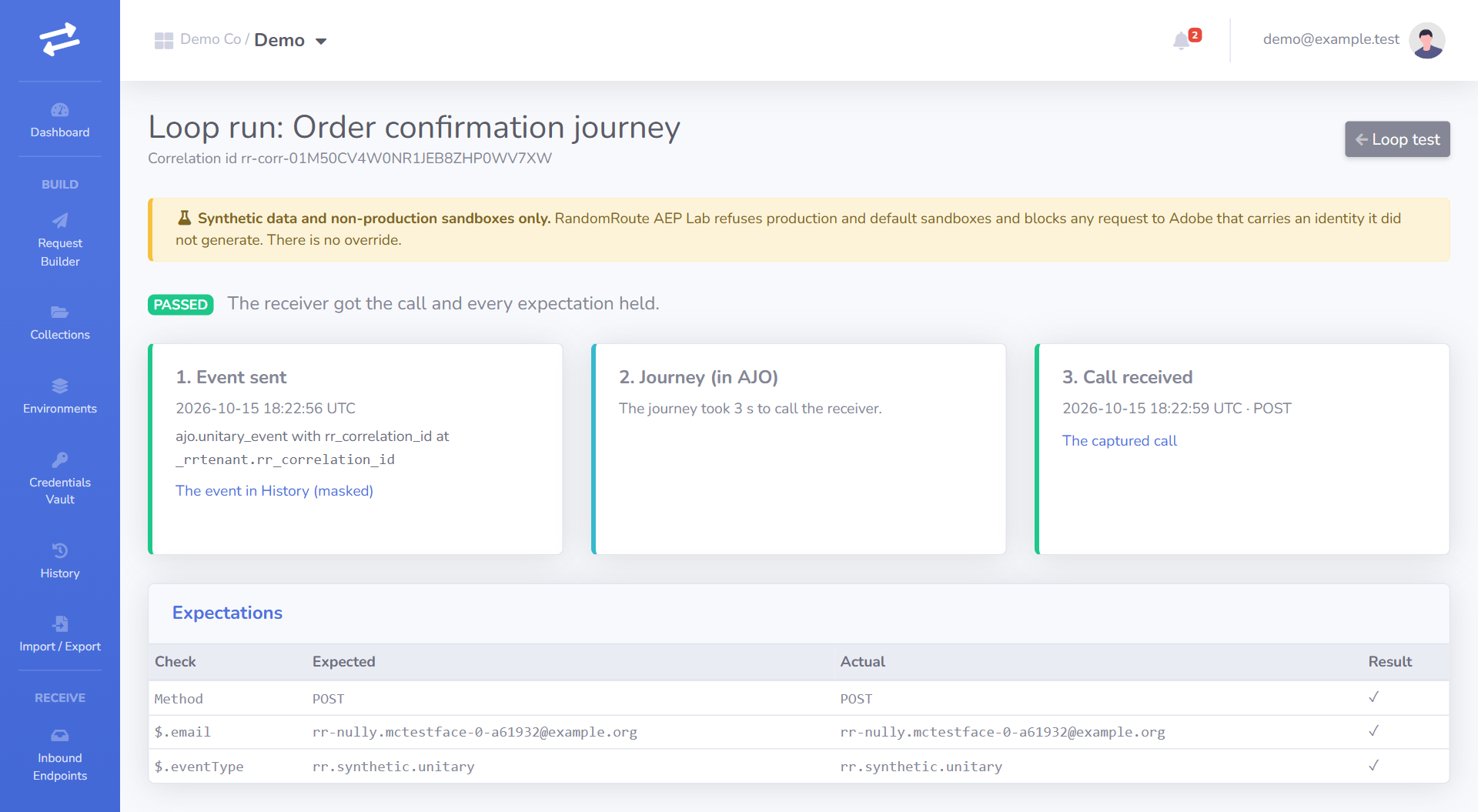
The run page shows a three-column timeline: what was sent, what Adobe answered, and what arrived at the receiver, with a diff of expected and actual values.
Outcomes
| Status | Meaning |
|---|---|
| PASSED | The receiver got the call and everything matched. |
| FAILED | The call arrived but a value, the method or the schema didn't match (the diff says which), or Adobe rejected the event. |
| TIMED_OUT | No matching call arrived in time. The run says what RandomRoute AEP Lab did see: calls that failed authentication (with the reason), calls without this run's correlation id, or no calls at all. |
| BLOCKED | A guard refused the event (production sandbox or non-synthetic data). Nothing was sent. |
11. API-triggered campaigns
An API-triggered campaign in Journey Optimizer sends a message when its API is called. RandomRoute AEP Lab can trigger one for a synthetic profile.
- In Journey Optimizer → Campaigns, create an API-triggered campaign (transactional or marketing) for the channel you want to test, and activate it in the development sandbox.
- Copy the campaign id from the campaign's cURL request panel, and paste it into the connection as AJO campaign ID.
- Run the
ajo.campaign.triggerrecipe ("Trigger an API-triggered campaign"; it's in the Recommended suite once the id is set). It callsPOST https://platform.adobe.io/ajo/im/executions/unitarywith the synthetic profile's email as the recipient.
The step passes when Adobe answers 202 Accepted with an executionId, which the report shows. Adobe's Interactive Message Execution API has no status endpoint for unitary executions, so RandomRoute AEP Lab can't follow the message further. Check delivery in the campaign's reports in AJO.
The profile must exist in the sandbox before the campaign can address it: run "Stream a synthetic profile" first.
Messages go to synthetic addresses (@example.com and similar), which can't receive mail. To see a rendered message, use AJO's own proof and preview tools.
12. Automate
Monitors
Go to Monitors → New monitor, pick AEP Lab suite instead of a collection, and set a cron schedule (no more often than your plan allows). Each run counts toward your plan's monthly Adobe run limit. When a scheduled run fails or is blocked, the people listed on the monitor get one email ("AEP Lab suite … failed at step …") and organization admins get an in-app alert. The dashboard's RandomRoute AEP Lab card shows the last run, the 30-day pass rate and the next scheduled run.
Public API (CI)
Create a token under Test Tokens with the scopes you need:
adobe:readlists connections, suites and loop tests, and reads runs.adobe:runverifies a connection and starts suite and loop-test runs (and can read the runs it starts).
Starting a run always answers 202 Accepted with a Location header. Poll it until finished is true, then check status:
RUN=$(curl -fsS -X POST -H "Authorization: Bearer $AWK_TOKEN" \
  https://api.randomroute.io/api/v1/adobe/suites/$SUITE_ID/runs | jq -r .id)

until curl -fsS -H "Authorization: Bearer $AWK_TOKEN" \
  https://api.randomroute.io/api/v1/adobe/suite-runs/$RUN | jq -e .finished >/dev/null; do sleep 10; done

curl -fsS -H "Authorization: Bearer $AWK_TOKEN" \
  https://api.randomroute.io/api/v1/adobe/suite-runs/$RUN | jq -e '.status == "PASSED"'
The same steps as a GitHub Actions job:
jobs:
  adobe-lab:
    runs-on: ubuntu-latest
    steps:
      - name: Run the RandomRoute AEP Lab suite
        env:
          AWK_TOKEN: ${{ secrets.AWK_TOKEN }}
          SUITE_ID: ${{ vars.ADOBE_SUITE_ID }}
        run: |
          RUN=$(curl -fsS -X POST -H "Authorization: Bearer $AWK_TOKEN" https://api.randomroute.io/api/v1/adobe/suites/$SUITE_ID/runs | jq -r .id)
          for i in $(seq 1 60); do
            BODY=$(curl -fsS -H "Authorization: Bearer $AWK_TOKEN" https://api.randomroute.io/api/v1/adobe/suite-runs/$RUN)
            if [ "$(echo "$BODY" | jq -r .finished)" = "true" ]; then break; fi
            sleep 10
          done
          echo "$BODY" | jq '{status, totals, first_failure}'
          echo "$BODY" | jq -e '.status == "PASSED"'
Errors use application/problem+json. A run refused because one is already in progress, or because the monthly limit is reached, answers 409. Every endpoint is described in the API reference.
Completion webhook
Admins can set a webhook under RandomRoute AEP Lab → Suites → Completion webhook: a URL, and an HMAC signature credential from the vault that signs each delivery. When a suite run or loop-test run finishes, RandomRoute AEP Lab POSTs a JSON body with event (adobe.suite_run.finished or adobe.loop_run.finished), workspace and run (the same object the API returns), signed with the credential. With the default HMAC settings:
X-Timestamp: 1760520000
X-Signature: hex(HMAC-SHA256(secret, "<X-Timestamp>.<raw body>"))
Verify the signature over the raw body before parsing it, and reject old timestamps. Deliveries go through the same guarded outbound client as everything else (no private addresses). They are not retried; the webhook page shows the last delivery's status.
13. Data handling and retention
What RandomRoute AEP Lab stores:
- Connections: the sandbox name, the optional ids, the verification result and when it was made. The Adobe client secret lives only in the credentials vault, encrypted, and is never shown, logged or exported again. The IMS access token is cached encrypted until shortly before it expires.
- Synthetic profile sets: the generated profiles (synthetic by construction).
- History: every request to Adobe, with secrets masked by name and by value. A request refused for non-synthetic data is stored without its body and query.
- Suite and loop-test runs: the step results, the diffs, and the masked request and response of each step.
- Receiver calls: each call AJO makes, with masked headers and the body, like any inbound endpoint.
How long: history, receiver calls, collection runs and RandomRoute AEP Lab runs are deleted by the nightly retention job after your plan's retention period. A receiver, like any endpoint, can be set to keep its calls for less time.
Deleting everything: delete loop tests and suites first, then receivers, profile sets and the connection (RandomRoute AEP Lab won't delete something that's still in use, and tells you what uses it). Finally delete the "Adobe IMS" credential in the vault, which also deletes its cached token. Deleting the workspace deletes all of it at once.
Outside RandomRoute AEP Lab's control: what you sent to the sandbox stays in the sandbox (profiles, events, journey and campaign reports) until you delete it there, and Adobe keeps its own logs. Because the data is synthetic, none of it identifies a real person. To clean the sandbox, delete the datasets, or reset the development sandbox in Experience Platform.
14. FAQ
Can I use my production sandbox for read-only calls? No. Every request to a production sandbox is refused, reads included. There's no override.
Can I whitelist one real email address for a demo? No. Every value sent to Adobe must be synthetic, and there are no exceptions. If you need a demo to land in a real inbox, set up forwarding from a synthetic-looking address outside RandomRoute API Workbench, on infrastructure you control.
Which regions are supported?
Adobe hosts are on a fixed allowlist: the IMS token endpoint ims-na1.adobelogin.com, the Platform API platform.adobe.io (and regional platform-*.adobe.io hosts), and streaming inlets on dcs.adobedc.net (and regional dcs-*.adobedc.net hosts). Paste the inlet URL Adobe gives you; if its host isn't on the list, the request is refused with ADOBE_HOST_NOT_ALLOWED.
What about the Edge Network and the Web SDK? Not in scope. RandomRoute AEP Lab sends data through the HTTP API streaming source only. No recipe calls the Edge Network, and there's no Web SDK or Mobile SDK support.
Can I call Adobe from the request builder? Yes, with the connection's "Adobe IMS" credential on the request. The same guards apply: the request must target the connection's sandbox and contain only synthetic data.
Why did a suite step say "Skipped"? The connection is missing an id that recipe needs (for example an AJO campaign id). The step names the missing field.
Does a suite run count toward a limit?
Yes. Suite runs and loop-test runs count toward your plan's monthly Adobe run limit. When it's reached, new runs are refused with a message saying so (409 through the API) until the next month.